
Sales by Close Period, and Reconciliation Reports in PDF and CSV
Fuel sales and totalizer readings can be broken down close by close, and Monthly Inventory Reconciliation reports can be downloaded as PDF or CSV.
A period total shows how much fuel a site sold, but not when. Sales reviews, shift audits, and reconciliation often depend on the figures for each individual close, and on being able to take those figures into other tools. This release provides both.
What Is New
- Break down by close — the Fuel Sales and Totalizers views can show one row per close period, numbered in order, and the trend chart plots one point per close
- Totalizer ranges that hold across closes — when broken down by close, the totals for each grade run from the opening reading of the first close to the closing reading of the last
- Clearer date columns — sales tables and their CSV exports identify the first opening and last close in the selected range, or the opening and close of each period when broken down
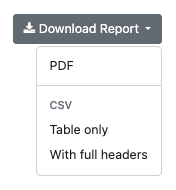
- Reconciliation reports in PDF and CSV — Monthly Inventory Reconciliation reports can be downloaded as a PDF document, as a CSV table, or as a CSV with full report headers

Why It Matters
Variances can be traced to the close in which they occurred, and reconciliation results can be filed as documents or analyzed in spreadsheets and accounting systems.
Related Features
See This in Your Own Operation
Request a walkthrough of the platform with your sites, tanks, and reporting needs in mind.
More Updates
View all updates →Safeguards for the Commands That Reach Tank Gauges
Cryptographic signing adds a further layer of protection to the commands relayed to tank gauges, and security codes that a gauge could misread as a command are checked before they are saved.
POS Close Reports for Every Period, and Sales Access by User
Close reports now cover every period and arrive by email, and access to sales and reconciliation data can be granted user by user.
Net Delivery Volumes and Improved Sensor Mapping for Underground Tanks
Deliveries now show net, temperature-compensated volumes with the source of every figure, and the mapping and handling of 2-Wire CL and 3-Wire CL sensors has been improved.